Stop guessing. Get GA4 and Search Console set up right.
We configure GA4 and Google Search Console so your reporting is trustworthy: clean conversions, correct property connections, and a baseline dashboard your team can actually use.
We do not take on two direct competitors in the same industry and service area at the same time on Tier 2 plans and up. Ask if your niche and location qualify.
Certifications are a baseline. The real value is clean measurement, tight QA, and clear documentation your team can reuse.
Team sync join-ins available Join-ins when neededIf a stakeholder or dev sync will unblock implementation, we can join to keep momentum and prevent measurement drift.
Built for decisions, not vanity metrics
Clean analytics is the baseline for SEO, paid media, and content. When tracking is right, every channel gets easier to improve.
Release The Hounds
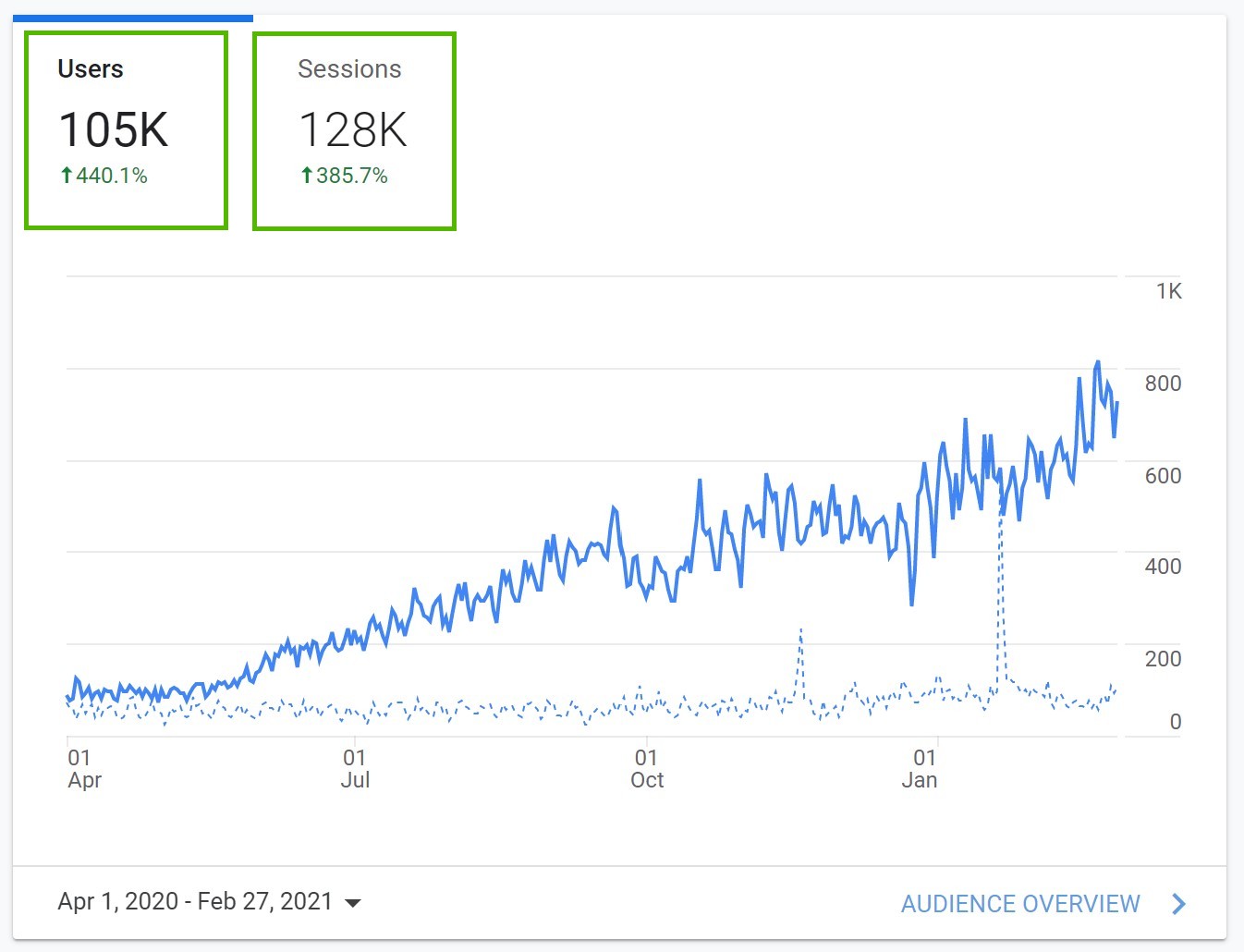
Proof that Search Console visibility translates into growth when measurement and execution are aligned.
What “setup done right” actually means
We align GA4 and Search Console with how your business really works, then validate everything with a clean QA pass.
- Cleaner data (internal traffic, spam, and noisy parameters handled appropriately)
- Key events and primary conversions aligned with real lead intent
- Cross-domain and subdomain journeys repaired when attribution breaks
- Search Console verification, property choices, and GA4 linking confirmed
- Handoff docs so your team does not lose the setup six months later
What’s included in GA4 and Search Console setup
You get a clear baseline, clean connections, and a documented setup your team can trust. If you need deeper attribution, we will recommend the right next layer.
GA4 setup or cleanup
Property review, stream validation, and configuration cleanup so reports behave predictably.
Key events and conversions
We define and validate key events for the actions that matter: forms, calls, bookings, and checkout milestones.
Search Console connection
Correct property selection, verification support, and GA4 linking so Search Console data flows into your workflow.
Cross-domain fixes
If checkout or booking happens off-domain, we repair session continuity so attribution does not fragment.
QA checklist
We validate events, conversions, referral sources, and expected reporting behaviour before handoff.
Documentation and handoff
Clear notes on what’s implemented, what to watch, and what to do next if your funnel changes.
When you should upgrade beyond setup
If you need lead quality, offline conversions, or consent-resilient attribution, we can layer on the right add-ons without rebuilding everything.
How we run GA4 and Search Console setup
Tight scope, fast execution, and a QA-driven finish. You always know what’s happening and what “done” means.
Access + audit
- Confirm GA4, Search Console, GTM, and CMS access
- Document your conversion path (forms, calls, bookings, checkout)
- Identify attribution breaks (cross-domain, self-referrals, duplicated tags)
- Set a baseline snapshot so improvements are measurable
Guardrails that keep reporting stable
Setup is not only tags. We also protect the system from common drift: UTMs, channel hygiene, and consent realities.
UTM and channel hygiene
We recommend a clean UTM structure so you can trust channel reports and avoid “direct” taking credit for everything.
Consent-resilient measurement
If you run a consent banner, measurement changes. We help you plan what stays accurate and what needs upgrades.
Reporting you can use
Tier 2+ includes a baseline dashboard to align your team on the handful of metrics that actually matter.
Quick reality check: GA4 vs leads
If GA4 shows plenty of conversions but your CRM does not, it’s usually one of these: duplicate tags, wrong conversion definition, broken cross-domain journeys, or form submissions not mapped to the right event. Setup fixes the baseline. If you need lead quality and pipeline stages, add offline conversion tracking.
GA4 and Search Console setup pricing
Three one-time tiers. Choose the depth you need now, with clear options to upgrade later without rework.
Foundation
Outcome: stop flying blind with clean conversion tracking.
- GA4 setup or cleanup
- GTM review
- Up to 5 events
- 1 primary conversion
- QA checklist
- Handoff doc
What’s included in detail
Guardrails: One domain. Add-ons available (server-side tagging, CRM imports, dashboards, call tracking). Inputs needed: GA4/GTM access.
Typical timeline: 5 to 7 business days.
Growth
Outcome: cleaner attribution and better reporting confidence.
- Everything in Foundation
- Up to 12 events
- Cross-domain fixes if needed
- Search Console connection
- Baseline dashboard
- Handoff call
What’s included in detail
Guardrails: One domain. Add-ons available (server-side, offline conversions, enhanced conversions, dashboard upgrades). Inputs needed: domain list and forms list.
Typical timeline: 7 to 10 business days.
Scale
Outcome: scale-ready measurement and reporting.
- Everything in Growth
- UTM and channel hygiene
- Lead quality field recommendations
- Custom dashboard spec
- 2-week post-launch QA support
- Stakeholder workshop
What’s included in detail
Guardrails: One domain. Add-ons available (server-side tagging, CRM automation, offline conversions project). Inputs needed: CRM fields and lead stages.
Typical timeline: 2 to 3 weeks.
Common add-ons
Guardrails are not limitations. They keep projects fast. If your stack needs more, add the right layer without bloating the base setup.
Timeline
Foundation: 5 to 7 business days. Growth: 7 to 10 business days. Scale: 2 to 3 weeks. Timelines depend on access speed and how many domains or cross-domain paths are involved.
What we need from you
Admin or editor access to GA4 and Search Console, plus GTM access if tags are involved. If you have multiple forms or booking flows, a short list of URLs and what counts as a “real lead” makes the setup much tighter.
Tier comparison
Fast way to choose. If you are unsure, Growth fits most teams.
| Capability | Foundation | Growth | Scale |
|---|---|---|---|
| GA4 setup or cleanup | Yes | Yes | Yes |
| Key events and primary conversion | Up to 5 events, 1 conversion | Up to 12 events | Custom mapping + lead quality guidance |
| Search Console verification + GA4 linking | Yes | Yes | Yes |
| Cross-domain fixes | As needed (light) | Included if needed | Included |
| Baseline dashboard | No | Included | Custom spec |
| Post-launch QA support | No | Light support via handoff | 2 weeks |
FAQs
Common questions about GA4 and Search Console setup, scope, and what happens after delivery.
Do you create new accounts or fix existing ones?
Will this fix broken attribution across subdomains or checkout?
What counts as a “conversion” in GA4?
Do you set up dashboards?
What if we have a consent banner (cookie consent)?
Can you set this up for Shopify or WordPress?
What happens after setup is delivered?
Related services
If you want to push measurement deeper, these pair well with GA4 and Search Console setup.
Conversion Tracking Setup (GA4 + GTM)
Tracking-first implementation for clean, validated conversions across your funnel.
SEO Conversion Tracking and Lead Attribution
Capture first-touch and last-touch context so SEO performance is measurable beyond traffic.
SEO Reporting and Dashboards
Executive-friendly reporting that stays focused on pipeline and revenue outcomes.
Book your GA4 and Search Console setup call
Tell us what you’re tracking and what feels wrong. We’ll confirm the right tier, scope, and timeline. No contracts. Reply within 1 business day.
What we’ll cover (15 minutes)
- Your conversion path and where attribution breaks
- Which tier fits your event count and complexity
- Delivery timeline based on access and platform
- Optional upgrades (offline conversions, dashboards, consent resilience)
Send details (step 1 of 2)
We’ll confirm scope by email, then you’ll book a time (Calendly) on the next step.